Every feature,
at a glance.
Analyse your storage, clean up with a review step and look after your Mac or PC, all in one app. Your files and scan results stay on your computer.
Disk Space Analysis
See exactly where your space went, from the whole drive down to a single file.
- Scan a drive, a folder or up to eight locations at once. Cloud placeholders aren’t followed by default, so a scan doesn’t trigger downloads.
- Storage Orbit, Sunburst, Treemap, Pie, Bars and List views, plus breakdowns by file type, age and owner.
- Save a scan and compare it with a later one to see what was added, removed, grew or shrank.
- Filter and search the results by type, size, age, owner or path, and save searches as templates.
- Copy, move, zip, rename in bulk or send items to the Trash or Recycle Bin, straight from the results.
- Export to XLSX, CSV, HTML, XML, SQLite, PDF or text, with paths and owners masked if you prefer.
- Start a scan from the Explorer context menu, or compare a folder with an earlier Volume Shadow Copy.Windows
Remote sources
Analyse clouds, servers and NAS shares the way you analyse a drive.
- Amazon S3 buckets, Azure Blob Storage containers, Google Drive folders, SharePoint document libraries and Outlook mailboxes.
- WebDAV folders and NAS shares, and SSH or SFTP servers with a pinned host key.
- Phones and cameras over USB, and VHD or VHDX drive images attached read-only.Windows
- Reads names, sizes and dates only, and never downloads file contents.
- Credentials stay in your operating system’s credential vault.
- Up to eight locations at once. If one can’t be reached, the others still finish.
Deep Cleanup
Clear the caches, build output and AI models your tools leave behind, with every item explained first.
- 158cleanup rules across Mac and Windows (119 on Mac, 87 on Windows)
- 12AI model stores
- Developer caches and project build output, from npm, Cargo, Gradle and Bun caches to node_modules and Rust target folders.
- Dedicated cleaners for Docker build cache, Conda and extra Rust toolchains.
- AI model stores including Hugging Face, Ollama, LM Studio and Whisper. Models are never selected for you.
- Xcode device support files, archives and simulator runtimes.Mac
- Windows Update cleanup, Delivery Optimization files, system logs and the Recycle Bin.Windows
- Each item says what it holds, what you keep and which apps to close first.
- Cleanup rules stay out of Documents, Desktop, code repositories and cloud-sync folders, and anything that changed since the scan is skipped.
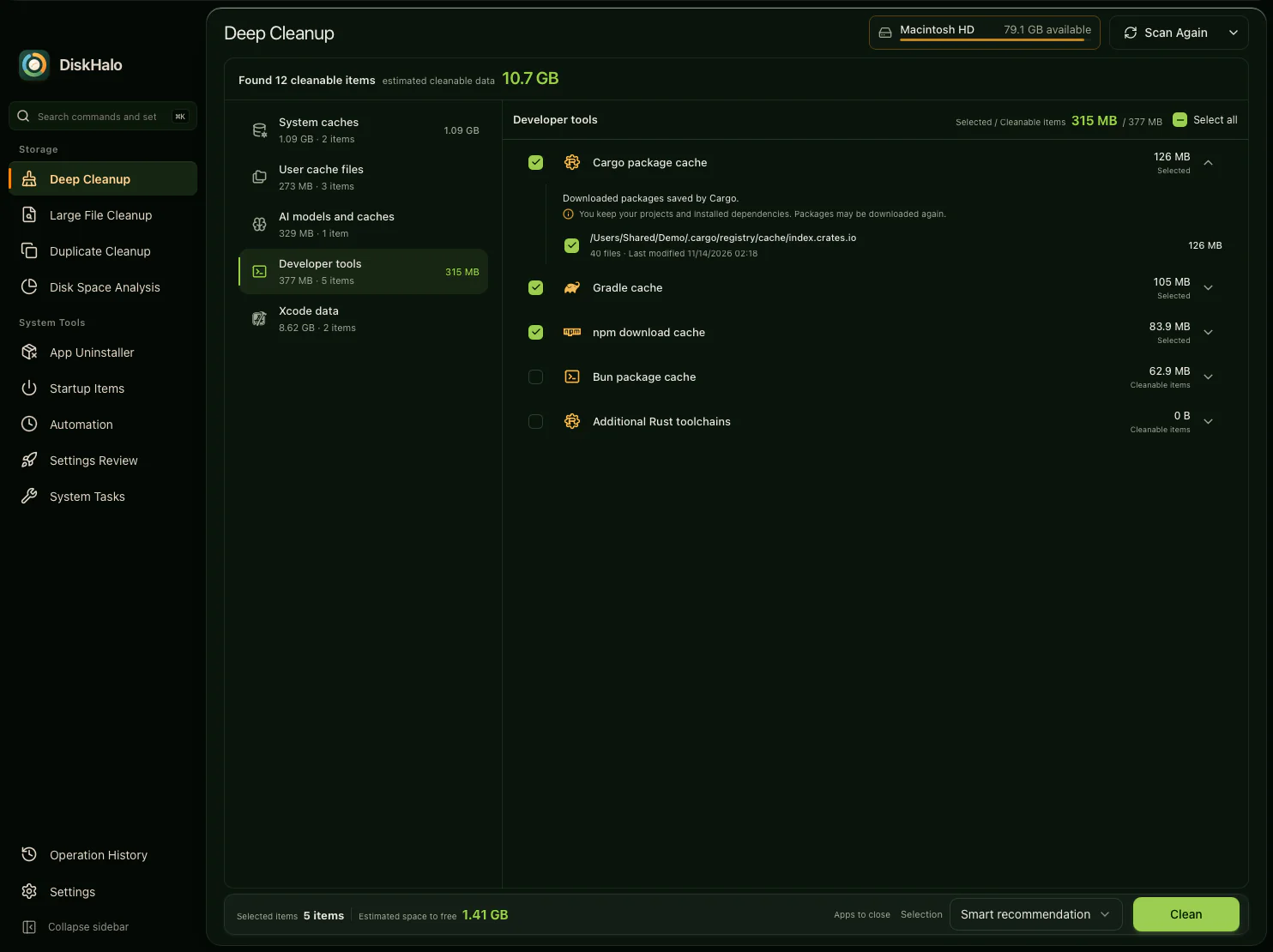
See it before you remove it. Nothing is deleted without your confirmation. Cleanup deletions are permanent. This applies to Deep Cleanup, Large File, Duplicate, app-leftover and Uninstaller deletions.
Large File Cleanup
Find the big files you forgot about, and choose which ones go.
- Set a minimum size and see every file above it, with its path, size and date.
- Filter by video, audio, images, documents, archives or AI models.
- Select several files and remove them in one confirmed step.
Duplicate Cleanup
Find files with identical content, keep one copy and clear the rest.
- Matches by content, not by name, and shows a SHA-256 or MD5 checksum for every group.
- Finds identical folders as well as identical files.
- Smart select keeps one copy per group: the shortest path, the shortest name, the oldest or the newest.
- Delete the extra copies, move or archive them, or replace them with hard or symbolic links.
- Every group always keeps at least one copy.
App Uninstaller
Remove apps cleanly, and see every related file before it goes.
- Removes the app with its caches, support files, preferences, logs, saved state and containers.Mac
- Labels every related item: required, can be recreated, or may contain user data.Mac
- Finds leftovers from apps you removed before, in Deep Cleanup.Mac
- Runs each app’s own uninstaller, including Microsoft Store, Scoop and Chocolatey apps, several at a time.Windows
- Shows which apps must be closed or need administrator approval first.
Startup Items
See what starts when you sign in, and switch off what you don’t need.
- Login items, launch agents and background items on Mac. Run entries, the Startup folder, scheduled tasks and services on Windows.
- Turn launch agents, Run entries, Startup folder items and scheduled tasks off, and back on later.
- Expand any item to see when it starts, what it runs and where it’s configured.
- Spot entries whose app is gone, and remove the leftover.
System Tasks and Settings Review
Run routine repairs and review system settings from one place, each step explained.
- Rebuild the Spotlight index and icon cache, refresh Quick Look and repair Open With.Mac
- Run SFC and DISM repairs, rebuild the search index and thumbnail cache, and reset the Store cache.Windows
- Restart the audio service, check the disk and flush the DNS cache on either system.
- Tasks that need administrator approval are marked before you run them.
- Settings Review recommends system setting changes, applies only the ones you choose and can restore your previous settings.
Automation, reports and history
Put routine scans and reports on a schedule, and keep a record of every cleanup.
- Schedule jobs daily, weekly, monthly, at startup, at sign-in or on a custom interval.Windows
- Chain up to eight actions in one job: scan, search, compare, export, email or file operations.Windows
- Every run keeps an audit trail, for as long as you choose.Windows
- Email a report through your own mail server, or export it to share.
- Operation History records every cleanup on your computer, with the expected and actual space freed.
Privacy and licence
Your files and scan results never leave your computer.
- Scanning, cleanup and history all happen on your computer.
- Licence sign-in and update checks send only the few details listed in the privacy notice.
- No licence key to lose. Sign in with your purchase email and a 6-digit code.
- One licence covers up to 3 of your own Mac or Windows devices.
- Moving to a new computer? Deactivate the old one in Settings and sign in on the new one.
Languages and themes
Use DiskHalo in your language, in the look you prefer.
- English, Japanese, Simplified Chinese and Traditional Chinese.
- Light, dark or follow your system, with Evergreen and Amber colour palettes.
- Find any command or setting with Cmd+K on Mac or Ctrl+K on Windows.
See it on screen.
Every screen in the tour is the real app on Mac, scanning demo files.
Browse use casesOne price. Mac and Windows. Up to 3 personal devices.
Take the tourAmazon S3, Azure, Google Drive, Microsoft SharePoint, Microsoft Outlook and the other product names on this page are trademarks of their respective owners. DiskHalo is not affiliated with, sponsored or endorsed by them.